
En este documento instalaremos un servidor OCS-Inventory para realizar inventarios automáticos de nuestros equipos de red. Esta herramienta la montaremos sobre un servidor Ubuntu 17.04, un apache2 y servidor de bases de datos MySQL.
Hemos ya preparado un Ubuntu Server 17.04 habiendo hecho una instalación totalmente por defecto
Dejo también aquí un vídeo donde se muestra toda el proceso de instalación y los pasos que veremos a continuación.
Instalación
Primero asignaremos una IP fija a la ethernet
sudo vi /etc/network/interfaces
Modificamos nuestra configuración de red, pasamos de dhcp a static y configuramos los parámetros de red
En mi caso modificaré la ethernet que esta montada cómo ens33, en vuestro caso será posiblemente otro nombre, tenéis que mantener la primera linea de auto así cómo el iface xxxx inet de la segunda linea
auto ens33
iface ens33 inet static
address 192.168.1.50
netmask 255.255.255.0
gateway 192.168.1.1
network 192.168.1.1
broadcast 192.168.1.255
dns-nameservers 8.8.8.8 8.8.4.4
En este punto podemos reiniciar la tarjeta de red mediante los comandos ifdown y ifup, pero también podemos reiniciar directamente el equipo, de este modo los cambios se van a aplicar seguro.
Utilizaremos:
sudo ifdown eth0 (eth0 es un ejemplo, en nuestro caso tendremos que ver cual es nuestra tarjeta de red)
sudo ifup eth0 (eth0 es ejemplo, en mi caso la ethernet se llama ens33)
En caso de duda podemos reiniciar el equipo con:
sudo shutdown now -r
Actualizamos repositorios y realizamos un upgrade
sudo apt-get update
sudo apt-get upgrade
Instalamos el servidor ssh, puesto que a partir de este momento trabajaremos des de un cliente ssh (Putty)
sudo atp-get openssh-server
Iniciamos la instalación de servidor web apache, MySQL, librerias php y perl que vamos a necesitar
sudo apt-get install wget build-essential apache2 php libapache2-mod-php7.0 php-gd libgd-dev unzip libapache2-mod-perl2 mysql-server libdbd-mysql-perl php-mysql php-mbstring php7.0-mbstring php7.0-mcrypt php-gettext php-soap php7.0-curl libxml-simple-perl libapache-dbi-perl libnet-ip-perl libsoap-lite-perl
Continuamos instalando dependencias vía CPAN
sudo cpan -i XML::Entities Compress::Zlib Archive::Zip
Activamos en php mcrypt y mbstring
sudo phpenmod mcrypt
sudo phpenmod mbstring
Reiniciamos apache2 y ya podemos probar mediante el navegador si nuestro servidor web esta disponible
sudo service apache2 restart
Editamos el arcivo de configuración de apache y añadimos la dirección del servidor en la ultima linea, en ese caso yo le voy a poner «localhost»
sudo vi /etc/apache2/apache2.conf
ServerName localhost
Conectamos al MySQL y creamos la base de datos y el usuraio y password que vamos a utilizar.
mysql -u root -p
CREATE DATABASE ocsweb
  DEFAULT CHARACTER SET utf8
  DEFAULT COLLATE utf8_general_ci;

GRANT ALL PRIVILEGES ON `ocsweb` .* TO 'ocsuser'@'localhost' IDENTIFIED BY 'ocspassword' WITH GRANT OPTION;
Ahora creamos una carpeta donde descargar y descomprimir el ocs server que vamos a instalar
cd /
sudo mkdir ocs
cd ocs
Vamos a la web de OCS Inventory NG https://www.ocsinventory-ng.org/en/ y copiamos la dirección de descarga del paquete de instalación de servidor Linux
Volvemos al puty y lo descargamos y descomprimimos.
sudo wget https://github.com/OCSInventory-NG/OCSInventory-ocsreports/releases/download/2.3.1/OCSNG_UNIX_SERVER-2.3.1.tar.gz
sudo tar -xzvf OCSNG_UNIX_SERVER-2.3.1.tar.gz
cd OCSNG_UNIX_SERVER-2.3.1/
Empezamos la instalación
sudo ./setup
ocs@ocs:/ocs/OCSNG_UNIX_SERVER-2.3.1$ sudo ./setup.sh
[sudo] password for ocs:

+----------------------------------------------------------+
|                                                          |
|  Welcome to OCS Inventory NG Management server setup !   |
|                                                          |
+----------------------------------------------------------+

Trying to determine whitch OS or Linux distribution you use
+----------------------------------------------------------+
| Checking for Apache web server binaries !                             |
+----------------------------------------------------------+

CAUTION: If upgrading Communication server from OCS Inventory NG 1.0 RC2 and
previous, please remove any Apache configuration for Communication Server!

Do you wish to continue ([y]/n)?
Assuming Communication server 1.0 RC2 or previous is not installed
on this computer.

Starting OCS Inventory NG Management server setup from folder /ocs/OCSNG_UNIX_SERVER-2.3.1
Storing log in file /ocs/OCSNG_UNIX_SERVER-2.3.1/ocs_server_setup.log

+----------------------------------------------------------+
| Checking for database server properties...                      |
+----------------------------------------------------------+

Your MySQL client seems to be part of MySQL version 5.7.
Your computer seems to be running MySQL 4.1 or higher, good ;-)

Which host is running database server [localhost] ?
OK, database server is running on host localhost ;-)

On which port is running database server [3306] ?
OK, database server is running on port 3306 ;-)


+----------------------------------------------------------+
| Checking for Apache web server daemon...                              |
+----------------------------------------------------------+

Where is Apache daemon binary [/usr/sbin/apache2ctl] ?
OK, using Apache daemon /usr/sbin/apache2ctl ;-)


+----------------------------------------------------------+
| Checking for Apache main configuration file...                  |
+----------------------------------------------------------+


Where is Apache main configuration file [/etc/apache2/apache2.conf] ?
OK, using Apache main configuration file /etc/apache2/apache2.conf ;-)


+----------------------------------------------------------+
| Checking for Apache user account...                                    |
+----------------------------------------------------------+

Which user account is running Apache web server [www-data] ?
OK, Apache is running under user account www-data ;-)


+----------------------------------------------------------+
| Checking for Apache group...                                                 |
+----------------------------------------------------------+

Which user group is running Apache web server [www-data] ?
OK, Apache is running under users group www-data ;-)


+----------------------------------------------------------+
| Checking for Apache Include configuration directory...   |
+----------------------------------------------------------+

Setup found Apache Include configuration directory in
/etc/apache2/conf-available.
Setup will put OCS Inventory NG Apache configuration in this directory.
Where is Apache Include configuration directory [/etc/apache2/conf-available] ?
OK, Apache Include configuration directory /etc/apache2/conf-available found ;-)


+----------------------------------------------------------+
| Checking for PERL Interpreter...                                             |
+----------------------------------------------------------+

Found PERL Intrepreter at  ;-)
Where is PERL Intrepreter binary [/usr/bin/perl] ?
OK, using PERL Intrepreter /usr/bin/perl ;-)


Do you wish to setup Communication server on this computer ([y]/n)?


+----------------------------------------------------------+
|             Checking for Make utility...                 |
+----------------------------------------------------------+

OK, Make utility found at  ;-)

+----------------------------------------------------------+
|        Checking for Apache mod_perl version...           |
+----------------------------------------------------------+

Checking for Apache mod_perl version 1.99_22 or higher
Found that mod_perl version 1.99_22 or higher is available.
OK, Apache is using mod_perl version 1.99_22 or higher ;-)

+----------------------------------------------------------+
|    Checking for Communication server log directory...    |
+----------------------------------------------------------+

Communication server can create detailed logs. This logs can be enabled
by setting integer value of LOGLEVEL to 1 in Administration console
menu Configuration.
Where to put Communication server log directory [/var/log/ocsinventory-server] ?
OK, Communication server will put logs into directory /var/log/ocsinventory-server ;-)

+----------------------------------------------------------------------------+
|    Checking for Communication server plugins configuration directory...    |
+----------------------------------------------------------------------------+

Communication server need a directory for plugins configuration files.
Where to put Communication server plugins configuration files [/etc/ocsinventory-server/plugins] ?
OK, Communication server will put plugins configuration files into directory /etc/ocsinventory-server/plugins ;-)

+-------------------------------------------------------------------+
|   Checking for Communication server plugins perl directory...     |
+-------------------------------------------------------------------+

Communication server need a directory for plugins Perl modules files.
Where to put Communication server plugins Perl modules files [/etc/ocsinventory-server/perl] ?
OK, Communication server will put plugins Perl modules files into directory /etc/ocsinventory-server/perl ;-)


+----------------------------------------------------------+
| Checking for required Perl Modules...                                 |
+----------------------------------------------------------+

Checking for DBI PERL module...
Found that PERL module DBI is available.
Checking for Apache::DBI PERL module...
Found that PERL module Apache::DBI is available.
Checking for DBD::mysql PERL module...
Found that PERL module DBD::mysql is available.
Checking for Compress::Zlib PERL module...
Found that PERL module Compress::Zlib is available.
Checking for XML::Simple PERL module...
Found that PERL module XML::Simple is available.
Checking for Net::IP PERL module...
Found that PERL module Net::IP is available.
Checking for SOAP::Lite Perl module...
Found that PERL module SOAP::Lite is available.
Checking for Archive::Zip Perl module...
Found that PERL module Archive::Zip is available.

+----------------------------------------------------------+
|         Checking for optional Perl Modules...            |
+----------------------------------------------------------+

Checking for Apache2::SOAP PERL module...
*** Warning: PERL module Apache2::SOAP is not installed !
This module is only required by OCS Inventory NG SOAP Web Service.
Do you wish to continue ([y]/n] ?
Checking for XML::Entities PERL module...
Found that PERL module XML::Entities is available.


+----------------------------------------------------------+
|                 OK, looks good ;-)                       |
|                                                          |
|     Configuring Communication server Perl modules...     |
+----------------------------------------------------------+

Checking if your kit is complete...
Looks good
Generating a Unix-style Makefile
Writing Makefile for Apache::Ocsinventory
Writing MYMETA.yml and MYMETA.json

+----------------------------------------------------------+
|                 OK, looks good ;-)                       |
|                                                          |
|      Preparing Communication server Perl modules...      |
+----------------------------------------------------------+


+----------------------------------------------------------+
|                 OK, prepare finshed ;-)                  |
|                                                          |
|     Installing Communication server Perl modules...      |
+----------------------------------------------------------+


+----------------------------------------------------------+
| OK, Communication server Perl modules install finished;-)|
|                                                          |
|     Creating Communication server log directory...       |
+----------------------------------------------------------+

Creating Communication server log directory /var/log/ocsinventory-server.

Fixing Communication server log directory files permissions.
Configuring logrotate for Communication server.
Removing old communication server logrotate file /etc/logrotate.d/ocsinventory-NG
Writing communication server logrotate to file /etc/logrotate.d/ocsinventory-server


+----------------------------------------------------------------------+
|        OK, Communication server log directory created ;-)            |
|                                                                      |
|   Creating Communication server plugins configuration directory...   |
+----------------------------------------------------------------------+

Creating Communication server plugins configuration directory /etc/ocsinventory-server/plugins.


+----------------------------------------------------------------------+
| OK, Communication server plugins configuration directory created ;-) |
|                                                                      |
|        Creating Communication server plugins Perl directory...       |
+----------------------------------------------------------------------+

Creating Communication server plugins Perl directory /etc/ocsinventory-server/perl.


+----------------------------------------------------------------------+
|     OK, Communication server plugins Perl directory created ;-)      |
|                                                                      |
|               Now configuring Apache web server...                   |
+----------------------------------------------------------------------+

To ensure Apache loads mod_perl before OCS Inventory NG Communication Server,
Setup can name Communication Server Apache configuration file
'z-ocsinventory-server.conf' instead of 'ocsinventory-server.conf'.
Do you allow Setup renaming Communication Server Apache configuration file
to 'z-ocsinventory-server.conf' ([y]/n) ?
OK, using 'z-ocsinventory-server.conf' as Communication Server Apache configuration file
Removing old communication server configuration to file /etc/apache2/conf-available/ocsinventory.conf
Writing communication server configuration to file /etc/apache2/conf-available/z-ocsinventory-server.conf

+----------------------------------------------------------------------+
|       OK, Communication server setup successfully finished ;-)       |
|                                                                      |
| Please, review /etc/apache2/conf-available/z-ocsinventory-server.conf |
|         to ensure all is good. Then restart Apache daemon.           |
+----------------------------------------------------------------------+


Do you wish to setup Administration Server (Web Administration Console)
on this computer ([y]/n)?

+----------------------------------------------------------+
|    Checking for Administration Server directories...     |
+----------------------------------------------------------+

CAUTION: Setup now install files in accordance with Filesystem Hierarchy
Standard. So, no file is installed under Apache root document directory
(Refer to Apache configuration files to locate it).
If you're upgrading from OCS Inventory NG Server 1.01 and previous, YOU
MUST REMOVE (or move) directories 'ocsreports' and 'download' from Apache
root document directory.
If you choose to move directory, YOU MUST MOVE 'download' directory to
Administration Server writable/cache directory (by default
/var/lib/ocsinventory-reports), especially if you use deployment feature.

Do you wish to continue ([y]/n)?
Assuming directories 'ocsreports' and 'download' removed from
Apache root document directory.

Where to copy Administration Server static files for PHP Web Console
[/usr/share/ocsinventory-reports] ?
OK, using directory /usr/share/ocsinventory-reports to install static files ;-)

Where to create writable/cache directories for deployment packages,
administration console logs, IPDiscover and SNMP [/var/lib/ocsinventory-reports] ?
OK, writable/cache directory is /var/lib/ocsinventory-reports ;-)


+----------------------------------------------------------+
|         Checking for required Perl Modules...            |
+----------------------------------------------------------+

Checking for DBI PERL module...
Found that PERL module DBI is available.
Checking for DBD::mysql PERL module...
Found that PERL module DBD::mysql is available.
Checking for XML::Simple PERL module...
Found that PERL module XML::Simple is available.
Checking for Net::IP PERL module...
Found that PERL module Net::IP is available.

+----------------------------------------------------------+
|      Installing files for Administration server...       |
+----------------------------------------------------------+

Creating PHP directory /usr/share/ocsinventory-reports/ocsreports.
Copying PHP files to /usr/share/ocsinventory-reports/ocsreports.
Fixing permissions on directory /usr/share/ocsinventory-reports/ocsreports.
Creating database configuration file /usr/share/ocsinventory-reports/ocsreports/dbconfig.inc.php.
Creating IPDiscover directory /var/lib/ocsinventory-reports/ipd.
Fixing permissions on directory /var/lib/ocsinventory-reports/ipd.
Creating packages directory /var/lib/ocsinventory-reports/download.
Fixing permissions on directory /var/lib/ocsinventory-reports/download.
Creating snmp mibs directory /var/lib/ocsinventory-reports/snmp.
Fixing permissions on directory /var/lib/ocsinventory-reports/snmp.
Creating Administration server log files directory /var/lib/ocsinventory-reports/logs.
Fixing permissions on directory /var/lib/ocsinventory-reports/logs.
Creating Administration server scripts log files directory /var/lib/ocsinventory-reports/scripts.
Fixing permissions on directory /var/lib/ocsinventory-reports/scripts.
Configuring IPDISCOVER-UTIL Perl script.
Installing IPDISCOVER-UTIL Perl script.
Fixing permissions on IPDISCOVER-UTIL Perl script.
Writing Administration server configuration to file /etc/apache2/conf-available/ocsinventory-reports.conf

+----------------------------------------------------------------------+
|        OK, Administration server installation finished ;-)           |
|                                                                      |
| Please, review /etc/apache2/conf-available/ocsinventory-reports.conf
|          to ensure all is good and restart Apache daemon.            |
|                                                                      |
| Then, point your browser to http://server//ocsreports
|        to configure database server and create/update schema.        |
+----------------------------------------------------------------------+


Setup has created a log file /ocs/OCSNG_UNIX_SERVER-2.3.1/ocs_server_setup.log. Please, save this file.
If you encounter error while running OCS Inventory NG Management server,
we can ask you to show us his content !

DON'T FORGET TO RESTART APACHE DAEMON !

Enjoy OCS Inventory NG ;-)

ocs@ocs:/ocs/OCSNG_UNIX_SERVER-2.3.1$
Vamos a crear los links simbólicos en sites-enabled para la web de administración y para la dirección donde vamos a mandar los inventarios des de los equipos remotos
sudo ln -s /etc/apache2/conf-available/ocsinventory-reports.conf /etc/apache2/sites-enabled/ocsinventory-reports.conf
sudo ln -s /etc/apache2/conf-available/z-ocsinventory-server.conf /etc/apache2/sites-enabled/
sudo service apache2 restart
Abrimos ya la web de ocs, mi caso de ejemplo la url es http://192.168.1.50/ocsreports
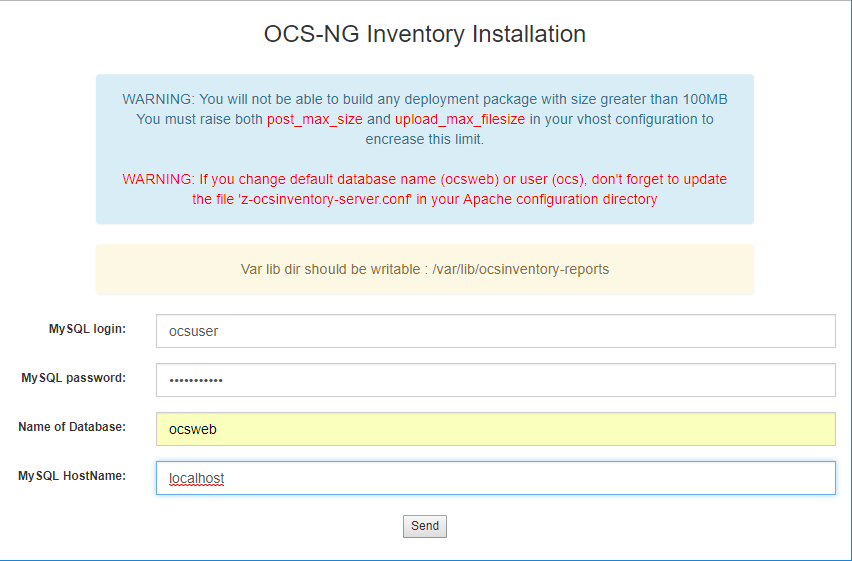
Si todo ha ido bien aparecerá la web de configuración donde indicaremos usuario/password, base de datos y servidor. Si habéis seguido el manual corresponden a:
ocsuser/ocspassword
ocsweb
localhost
Vemos que la instalación nos muestra o nos indica varios aspectos que deberemos tener en cuenta, en este caso vamos a aplicar el dicho de divide y vencerás y vamos a abordad punto a punto
Var lib dir should be writable : /var/lib/ocsinventory-reports

Para resolver esto concederemos la carpeta en cuestión al usuario www-data
sudo chown www-data:www-data -R /var/lib/ocsinventory-reports
WARNING: You will not be able to build any deployment package with size greater than 100MB
You must raise both post_max_size and upload_max_filesize in your vhost configuration to encrease this limit.

Aquí podemos ampliar el límite modificando el fichero ocsinventory-reports.conf
sudo vi /etc/apache2/conf-available/ocsinventory-reports.conf
En el ejemplo amplio a 200M
A nosotros nos aplica la configuración php7 pero modificaremos las dos
        AddType application/x-httpd-php .php
        php_flag file_uploads           on
        # Some PHP tuning for deployment feature up to 8 MB
        # post_max_size must be greater than upload_max_filesize
        # because of HTTP headers
        php_value post_max_size         200m
        php_value upload_max_filesize   200m
        # You may have to uncomment following on errors
        #php_value max_execution_time -1
        #php_value max_input_time -1

        # Uncomment following if you need to specify a mysql socket
        #php_value mysql.default_socket "path/to/mysql/unix/socket"

        #!! Mandatory !! : set magic_quotes_gpc to off (to make ocsreports works correctly)
        php_flag magic_quotes_gpc      off

    # Duplicate for php7 compatibility

        AddType application/x-httpd-php .php
        php_flag file_uploads           on
        # Some PHP tuning for deployment feature up to 8 MB
        # post_max_size must be greater than upload_max_filesize
        # because of HTTP headers
        php_value post_max_size         200m
        php_value upload_max_filesize   200m
        # You may have to uncomment following on errors
        #php_value max_execution_time -1
        #php_value max_input_time -1

        # Uncomment following if you need to specify a mysql socket
        #php_value mysql.default_socket "path/to/mysql/unix/socket"

        #!! Mandatory !! : set magic_quotes_gpc to off (to make ocsreports works correctly)
        php_flag magic_quotes_gpc      off
Una vez hecha la instalación si accedemos al entrono nos encontraremos este mensaje
SECURITY ALERT!
Your install.php exists in your installation directory.
The default SQL login/password is set on your database: ocsweb

Vamos pues primero a quitar el archivo install.php
sudo mv /usr/share/ocsinventory-reports/ocsreports/install.php /usr/share/ocsinventory-reports/ocsreports/install.php_old
Solo nos queda ya resolver la advertencia de seguridad del usuario y password que deberemos modificar en el archivo z-ocsinventory-server.conf, en caso de no corregir este tema,los inventarios de los equipos no van a llegar al servidor.
SECURITY ALERT!
The default SQL login/password is set on your database: ocsweb

Editamos
sudo vi /etc/apache2/conf-available/z-ocsinventory-server.conf
Modificamos:
# User allowed to connect to database
PerlSetEnv OCS_DB_USER ocsuser
# Password for user
PerlSetVar OCS_DB_PWD ocspassword
Reiniciamos apache y mysql
sudo service apache2 restart
sudo service mysql restart
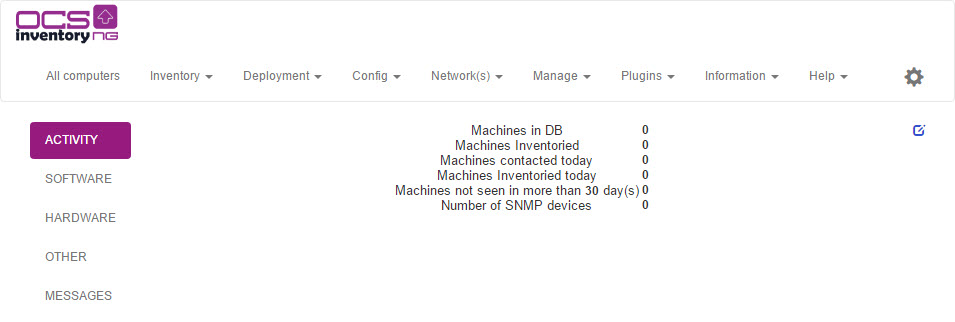
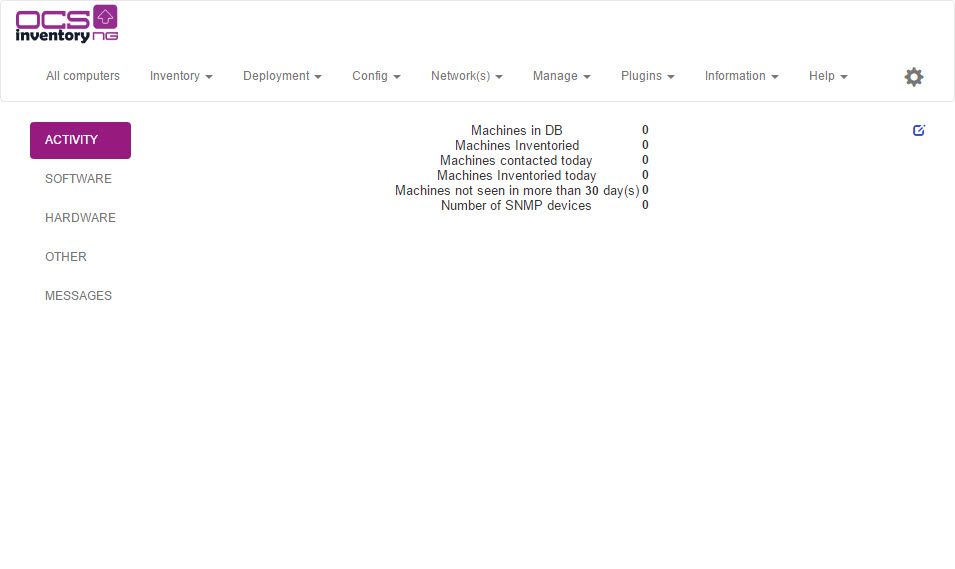
Llegados a este punto ya hemos finalizado la parte de servidor y solo nos falta instalar la herramienta cliente en un equipo para ver si los inventarios llegan correctamente.
Podemos descargar el cliente para las distintas versiones de sistemas operativos des de la web de OCS
https://www.ocsinventory-ng.org/en
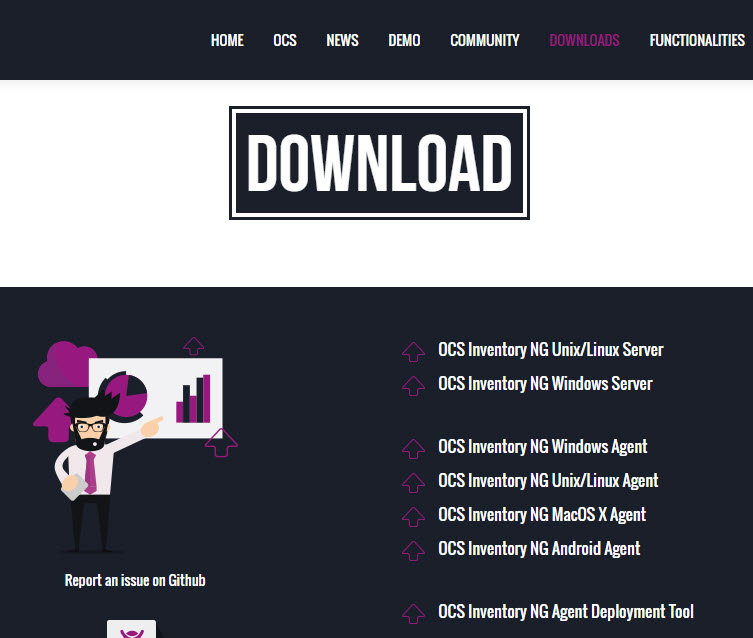
Seguimos la instalación cómo muestran las imagenes y si todo es correcto el equipo ya aparecerá en el inventario
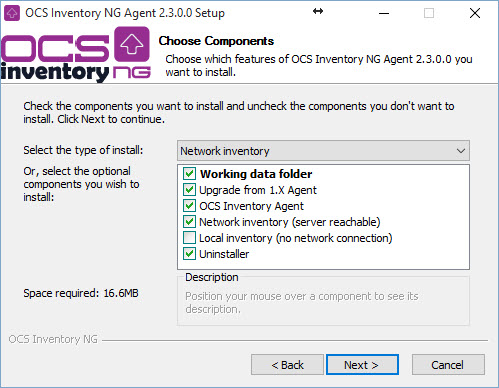
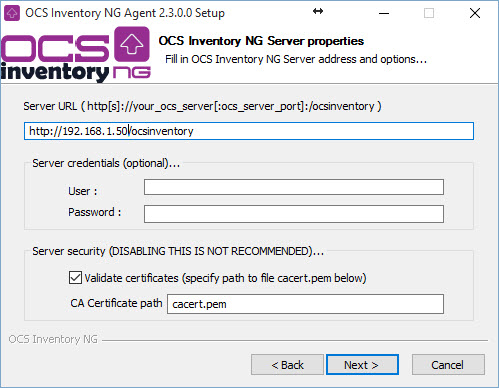
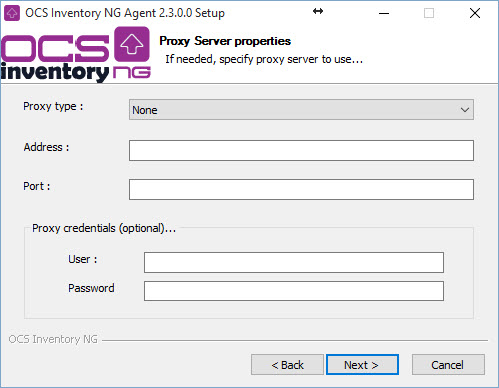
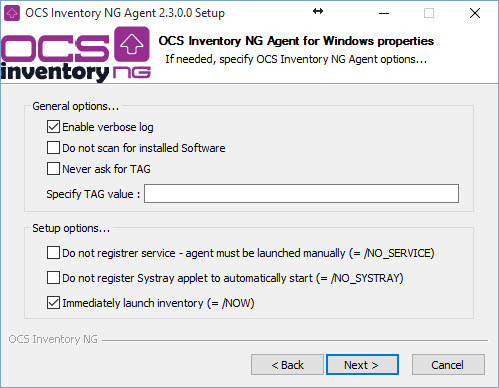
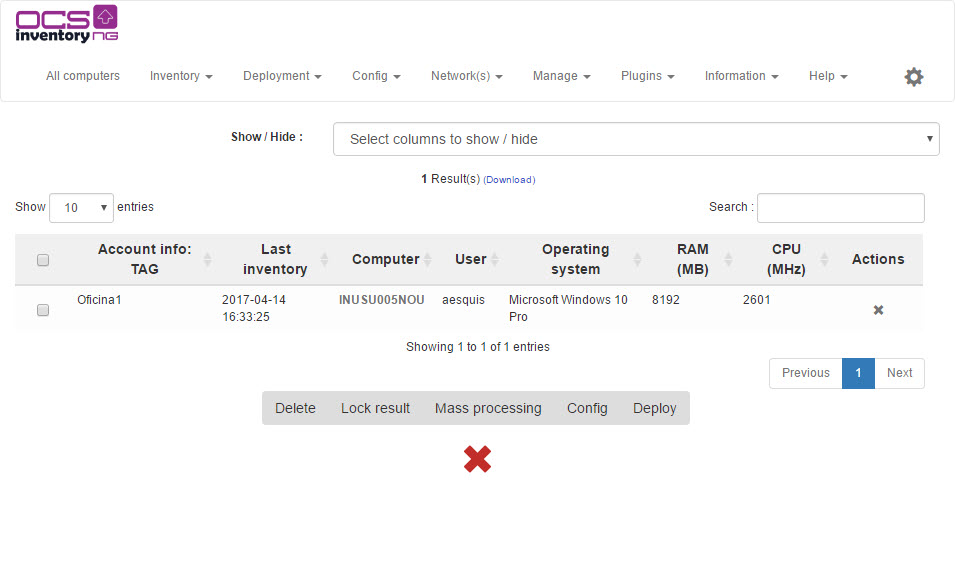
Para una mayor comodidad y poder realizar las instalaciones de un modo desatendido, podemos preparar un fichero bat que nos ayude a aplicar el cliente a nuestros equipos Windows
Ejemplo de ocs.bat situado en la misma carpeta del instalador. Por alguna razón el instalador se tiene que ejecutar des de una unidad de red o local, no sirve una ruta de recurso compartido del estilo \\computer\xxxx
OCS-NG-Windows-Agent-Setup.exe /SERVER=http://192.168.1.50/ocsinventory /SSL=1 /CA=cacert.pem /NOW /S
Espero que este manual os pueda ayudar.