Most of new Windows 10 devices allows you to login using fingerprint or facial recognition, but if your computer is under a domain policy probably you are not able to do this. I was searching for a god way to enable this option for domain end users, first of all I tryed to add a Windows 10 admx template to my domain controllers and then I enabled telemetrichs options on it, but it wasn’t enought, it didn’t work’s. finally I find a key on register where we can enable this option.
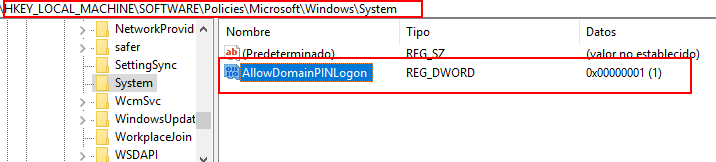
- Run “regedit”
- Go to <HKEY_LOCAL_MACHINE\SOFTWARE\Policies\Microsoft\Windows\System>
- Add “DWORD (32 bits)” Key
- AllowDomainPINLogon Hexadecimal 1
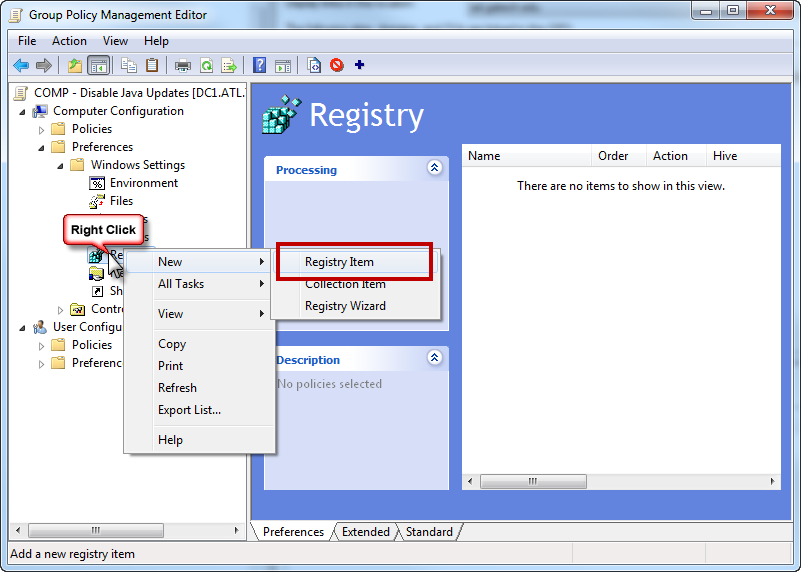
You can do this creating a new policy and apply to specific OU. (Don’t do this on Default domain policy, it’s much better to create a new one)

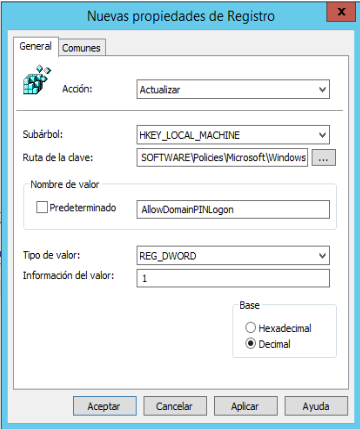
Take in mind to apply this new GPO where desired computers are located in your domain