When a critical PHP vulnerability comes out, upgrading is usually as easy as running your distribution’s updater. But what happens when the affected server still depends on a PHP version that no longer gets official patches as packages, and the application running on it isn’t compatible with any modern version?
In this article we explain, in a generic and reproducible way, how we fixed two critical PHP vulnerabilities (unauthenticated remote code execution) on a server that had to keep running PHP 7.4, by compiling the official patch from source and replacing only the vulnerable piece.
Warning: compiling and replacing PHP components by hand is a last resort, for cases where there’s no official package and you can’t migrate to a newer version in the short term. Whenever an official package exists, use the package. And always, always test it on a copy first and have a rollback path.
The problem
This was the scenario:
- A legacy application (an inherited CRM) that only works with PHP 7.4 and can’t be migrated to PHP 8 in the short term.
- PHP 7.4 is end of life: the PHP team and third-party repositories no longer publish new packages for this branch.
- Faced with a critical vulnerability, the PHP security team did publish the patch source code for older versions, aimed precisely at people who build from source.
The goal: apply that patch to the production server with minimal risk.
The key idea: replace only the module, don’t reinstall PHP
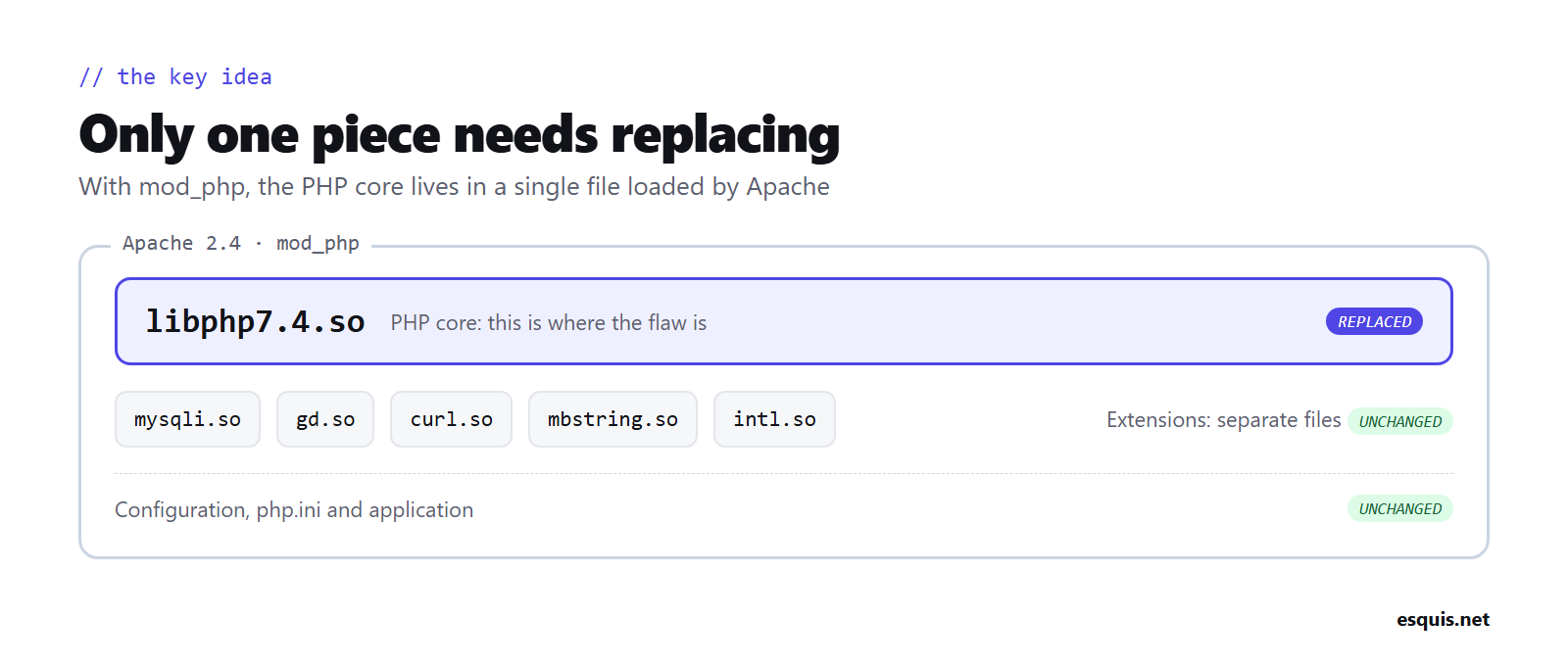
In a typical Apache setup with mod_php, PHP runs inside Apache as a module: a single file (libphp7.4.so). The vulnerability was in the PHP core, which lives inside that module.
So there’s no need to rebuild all of PHP or touch the extensions (database, images, mail, etc.), which are separate files. It’s enough to build a new module with the patch and swap it in, keeping everything else the same.
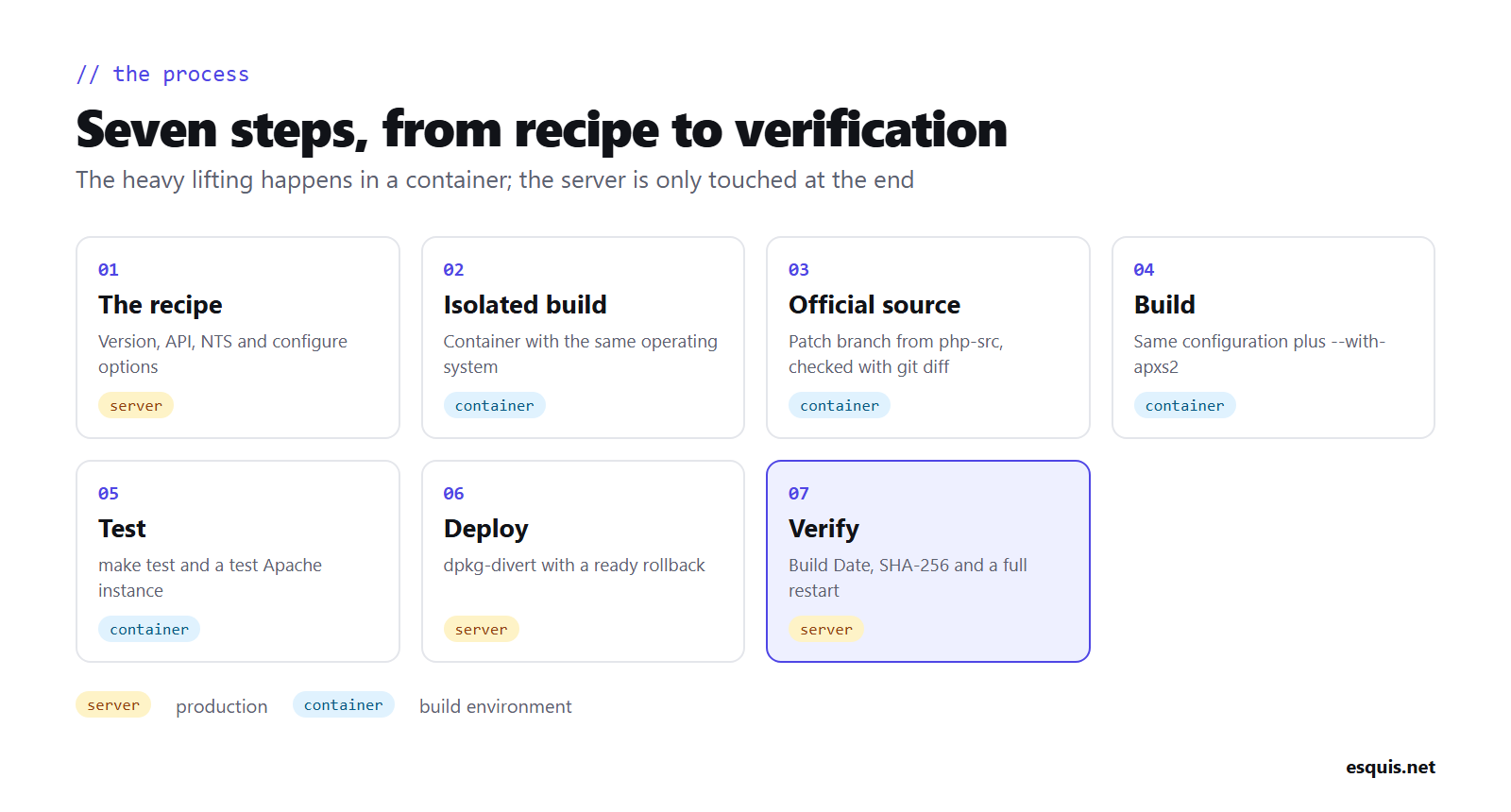
Step 1: collect the current installation’s “recipe”
First of all, you need to know exactly how the installed PHP was built, so you can reproduce it identically. The important details are:
- The exact version and PHP API numbers.
- Whether it was built with Thread Safety or without it (NTS).
- The build options (
./configure). - Which extensions are built into the core and which are external files.
You can check the version and architecture like this:
php -i | grep -E "^(PHP Version|PHP API|Thread Safety|extension_dir)"And the build options, if you have the -dev package installed:
php-config --configure-optionsThen make a copy of the current module, to serve as a reference and as your rollback:
cp /usr/lib/apache2/modules/libphp7.4.so /root/libphp7.4.so.originalStep 2: build in an isolated, identical environment
Building directly on the production server is a bad idea: it eats resources and leaves development tools installed. The clean solution is to build in a container running the same operating system as the server. That way the result is compatible, because inside the container we reproduce the same libraries the server has.
# Container with the same OS as the server
docker run -it --name build -v "$PWD":/out ubuntu:XX.XX bash
Inside the container, install the build tools and the development libraries PHP needs (XML, SSL, zlib, etc.):
apt-get update
apt-get install -y build-essential autoconf bison re2c pkg-config git \
  apache2-dev libxml2-dev libssl-dev libpcre2-dev zlib1g-dev \
  libargon2-dev libsodium-dev
Step 3: download the official patched source
The single most important point of the whole process: the code must come from the official source. The PHP security team publishes the patch in the official PHP repository, usually in a branch specific to the vulnerability, and always links to it from the official php.net advisory.
git clone --depth 1 -b <official-patch-branch> https://github.com/php/php-src.git
cd php-src
Check that the code is what it should be. Compare it with the official version you have installed: only the patched files should change, not hundreds of files.
git fetch --depth 1 origin tag php-7.4.XX
git diff --stat php-7.4.XX HEAD
If the difference is a handful of core files (memory management, request handling…), it’s the minimal patch on top of your version. If hundreds show up, the branch doesn’t match and you need to start from the exact official version and apply only the patch to it.
Step 4: build with the same configuration
Use the same recipe from step 1, with these conditions:
- Keep the configuration paths (
--with-config-file-path, etc.). - Build the Apache module with
--with-apxs2. - Keep the same Thread Safety mode (NTS for Apache prefork).
./buildconf --force
./configure <same-options-as-the-original-package> --with-apxs2=/usr/bin/apxs2
make -j"$(nproc)"
Before calling it done, check that the configuration produced the same built-in extensions as the original module and doesn’t enable Thread Safety when it shouldn’t.
Step 5: test the module before it goes to production
Two valuable checks:
a) The official test suite. The PHP source ships with thousands of automated tests. Run them to confirm the compiled module is solid:
make testb) A test Apache instance. Before touching the real service, you can start a test Apache on an internal port that loads the new module with the real configuration, extensions and add-ons, and check that the version is correct, that all extensions load and that it connects to the database. All without touching the production service.
Step 6: deploy and, above all, be able to roll back
First, strip the debugging information from the module so it ends up a similar size to the original:
strip --strip-unneeded libs/libphp7.so -o libphp7.4.so.patchedCopy the module to the server and check its integrity with its SHA-256 hash, to make sure it arrived intact:
sha256sum libphp7.4.so.patchedDeploy it so that package updates won’t overwrite your module. On Debian/Ubuntu-based systems, dpkg-divert does this: it “sets aside” the original file and leaves yours in its place:
dpkg-divert --local --rename --add /usr/lib/apache2/modules/libphp7.4.so
install -m 644 libphp7.4.so.patched /usr/lib/apache2/modules/libphp7.4.so
apache2ctl configtest && systemctl restart apache2
Roll back in a minute, if needed:
rm /usr/lib/apache2/modules/libphp7.4.so
dpkg-divert --local --rename --remove /usr/lib/apache2/modules/libphp7.4.so
systemctl restart apache2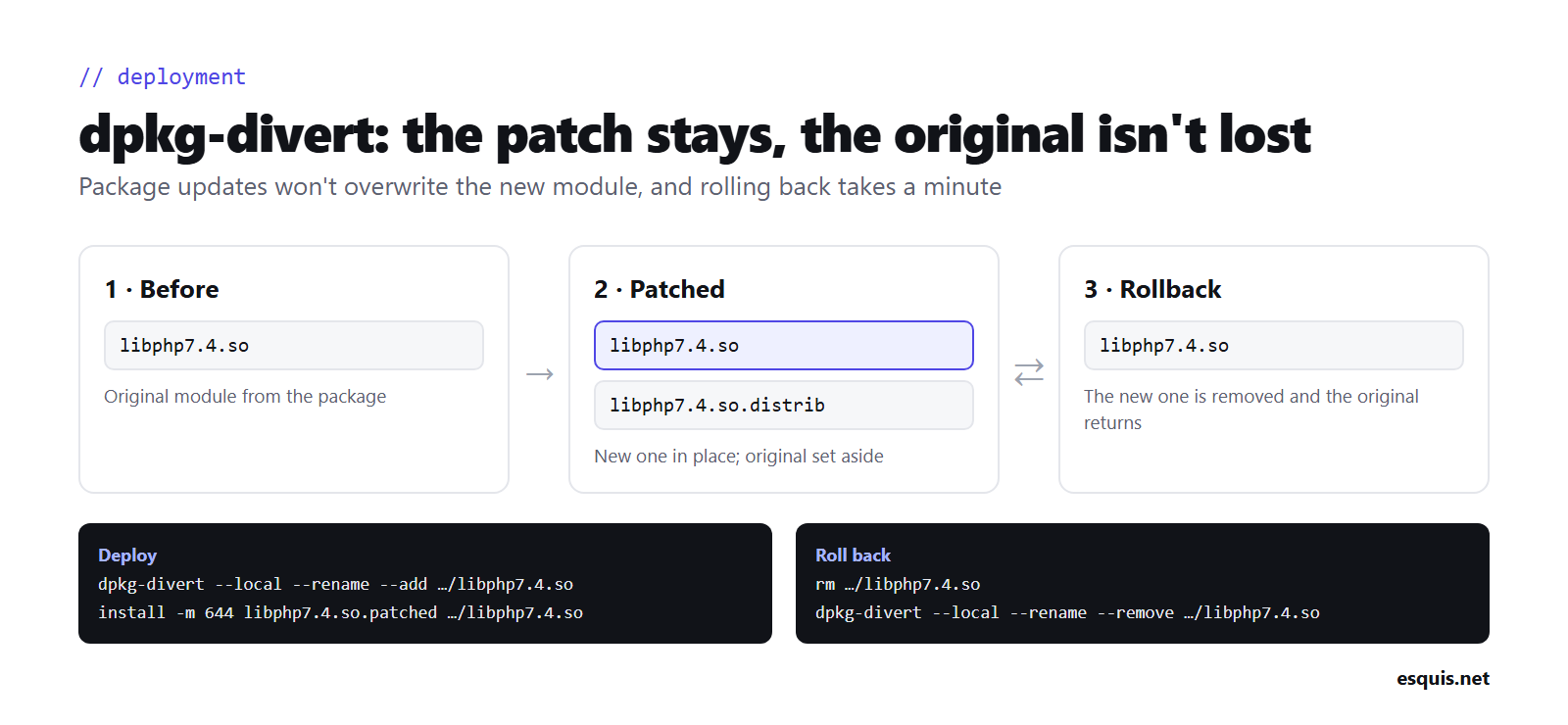
Step 7: verify the service is using the new module
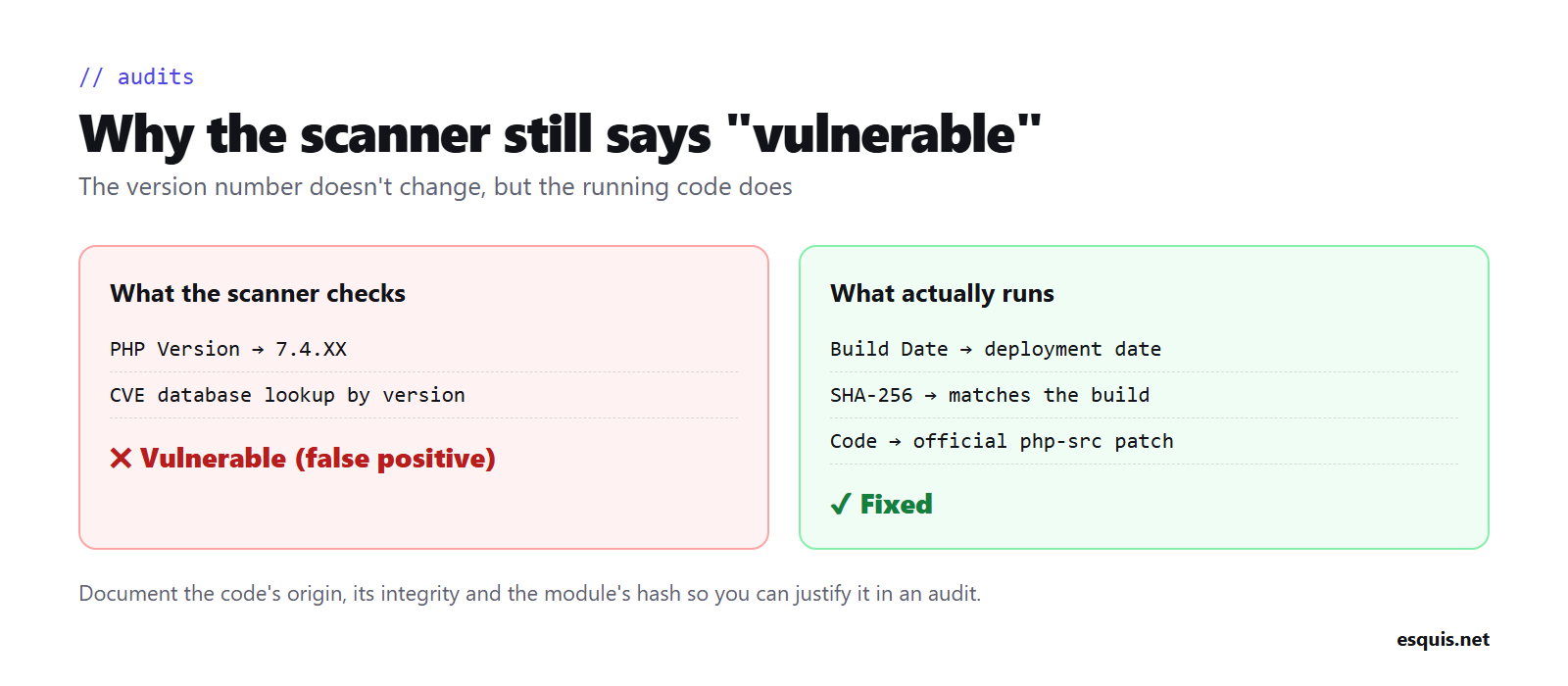
The version number doesn’t change (it’s still 7.4.XX), so you need to confirm it in other ways:
- The build date (
Build Datein aphpinfo) should be your deployment date, not the original one. - The installed module’s hash should match the one you calculated.
- No web server process should still have the old module loaded in memory (restart the service, don’t just reload it).
An important side effect: vulnerability scanners
Because the version number doesn’t change, vulnerability scanners (which often only read the version) will keep flagging the server as vulnerable. It’s a false positive. Document the process (code origin, integrity, hash of the deployed module) so you can justify it in an audit. It’s exactly the same standard used to validate distributions’ backported patches: you don’t test the attack on every server, you verify that the fixed code is what’s running.
Complementary measures while this lasts
Compiling the patch fixes the vulnerability, but a server running unsupported PHP and an unsupported operating system is still technical debt. Until you can migrate, it’s worth adding:
- The official mitigations recommended in the security advisory (often disabling specific features and limiting request size).
- Less exposure: restrict access to the internal network or a VPN, and put sensitive admin tools behind additional authentication.
- A real migration plan, because this solution is a bridge, not a destination.
Conclusion
When a critical vulnerability hits an unsupported PHP version, you’re not stuck between “leave it open” and “break the application”. If the PHP team publishes the patch source, you can build a fixed module, test it on a copy and deploy it with a clear rollback path, keeping both the version and the application intact.
It’s not the ideal path (the ideal is migrating to a supported version), but it’s a responsible way to buy the time you need to migrate properly, without leaving a critical hole open in the meantime.
Translated with the help of AI from the original Catalan article.